

Well, not really OpenAI’s ChatGPT, but close enough: we will run three different LLMs using
llama.cppwhich also provides a local server that offers a chat UI similar to OpenAI’s GPT.In this tutorial, I will show you how to download LLMs’ model weights, quantize them to lessen the load on the system, and then run them locally to answer any of your queries via a chat interface.

Introduction
While training LLMs requires hundreds or even thousands of GPUs running across hundreds of machines, actually running them for inference is possible using a reasonably recent Apple M2 laptop.
Not only this is cheaper than using a paid service (such as GPT+) but it’s also much faster, as you cut out the network latency (not to mention, contention with other users).
While not strictly necessary, it is usually convenient to “quantize” the weights to reduce the demand on memory and GPU, while maintaining the performance of the model up to a reasonable level of accuracy.
In this tutorial we will run three different LLMs using llama.cpp which also provides a local server that offers a chat UI similar to OpenAI’s GPT.
We will run the following three LLMs:
- SmolLM2-1.7B-Instruct
- Meta’s Llama 3.2 7B Instruc
- Starcoder
Read on to see how easy it is to have your very own code assistant running on your laptop.
The [[#References]] section contains a number of links for those who want to learn more about this topic.
Preparing the Environment
Python Virtualenv
To create the llama Python virtual environment, I highly recommend the use of virtualenvwrapper (also initialized with a bunch of useful stuff):
mkenv llama
pip install --upgrade pip
initenv
python -m pip install --upgrade -r \
   llama.cpp/requirements/requirements-convert_hf_to_gguf.txt
See Appendix for details about mkenv and initenv.
To activate the Virtualenv just use workon llama and to exit, deactivate.
Hugging Face CLI
Useful to download the models’ weights, instead of using the Web UI:
pip install huggingface_hub
huggingface-cli login  # Authenticate if required
Installing llama.cpp
On MacOS use Homebrew:
brew install llama.cpp

# We also need the contents of the repo:
git clone git@github.com:ggerganov/llama.cpp.git
NOTE The Python utility scripts that we will need later to quantize the model’s weights that are installed via Homebrew (and will be made available on your system’s
PATH) cause an error; just use instead the scripts in the cloned repo (using the relative path as I provide in the code snippets).
When initially experimenting with llama.cpp I followed this guide on SteelPh0enix’s Blog, which spends a great deal of time and effort in compiling the server from source: while this may be a valuable exercise for those into C++ and CMakeList files, it is largely irrelevant for the goal at hand of running LLMs locally, and, in my opinion, just installing it with Homebrew saves a great deal of (unnecessary) grief.
If you are into C++, I highly recommend you peruse my
distlibcollection of distributed systems algorithms 😉
SmollM2 1.7B Instruct
The first model that we will be using is SmolLM2-1.7B-Instruct : the model’s weights (in the model.safetensors file) are managed via Git LFS, and are the only part of the repo that will be necessary.
Instead of cloning the repo and using Git LFS, we just need to download the tensors before the next step:
huggingface-cli download \
    --include "*.safetensors"
    --local-dir ./SmolLM2-1.7B-Instruct \
    HuggingFaceTB/SmolLM2-1.7B-Instruct
Quantizing the Model
From SteelPh0enix's Blog (see [[#References]]):
There’s but one issue –
llama.cppcannot run “raw” models directly. What is usually provided by most LLM creators are original weights in.safetensorsor similar format.llama.cppexpects models in.ggufformat.
See GGUF on HuggingFace for more details.
Converting HF weights to GGUF format is done with:
./llama.cpp/convert_hf_to_gguf.py \
    SmolLM2-1.7B-Instruct \
   --outfile ./SmolLM2.gguf
Note
If you see an error:
 convert_hf_to_gguf.py SmolLM2-1.7B-Instruct \
     --outfile ./SmolLM2-1.7B-Instruct/SmolLM2.gguf

Traceback (most recent call last):
  File "/opt/homebrew/bin/convert_hf_to_gguf.py", line 1891, in <module>
>     class MiniCPM3Model(Model):
  File "/opt/homebrew/bin/convert_hf_to_gguf.py", line 1892, in MiniCPM3Model
    model_arch = gguf.MODEL_ARCH.MINICPM3
                 ^^^^^^^^^^^^^^^^^^^^^^^^
AttributeError: type object 'MODEL_ARCH' has no attribute 'MINICPM3'. Did you mean: 'MINICPM'?
Use the Python script in the cloned repository, as shown above.
Quantization
Roughly speaking, quantization means exactly what one think it does: the model’s weights are reduced in size to the desired byte-lenght; for example, a model whose weights are in 16-bit Float (pretty much the standard nowadays) are truncated to 8-bit integers, when using the Q8_0, roughly reducing the overall size of the model (on disk, and, eventually, in memory) by half.
To see all the available quantization types use:
llama-quantize --help
...
16 or Q5_K_S : 5.21G, +0.1049 ppl @ Llama-3-8B
...
Shows ID, mnemonic (either can be used to invoke) the example model size and Perplexity:
Perplexity is a metric that describes how certain the model is about its predictions. We can think about it like that: lower perplexity -> model is more certain about its predictions -> model is more accurate.
Most models you’ll encounter will be encoded in either BF16 or FP16 format, rarely we can find FP32-encoded LLMs. That means most of models have ==16 bits per weight by default==.
Note My MacBook has an M2 Max chip with 8 performance + 4 efficiency cores (total of 12 CPUs) and 32GB RAM; a 30-core GPU w Metal 3 support. This means it should be able to easily handle model sizes up to 8-12GB, depending also on how much one is prepared to slow down everything else. YMMV
llama-quantize \
    SmolLM2-1.7B-Instruct/SmolLM2.gguf \
    SmolLM2-1.7B-Instruct/SmolLM2.q8.gguf Q8_0 8

...
llama_model_quantize_internal: model size  =  3264.38 MB
llama_model_quantize_internal: quant size  =  1734.38 MB

ll SmolLM2-1.7B-Instruct/*.gguf
.rw-r--r--  3.4G marco  8 Dec 19:58  SmolLM2.gguf
.rw-r--r--  1.8G marco  8 Dec 22:14  SmolLM2.q8.gguf
so the overall size of the model is about half of what we started with (we quantized a 16-bit per weight, down to 8-bits, so that makes sense).
Running the Model
Running llama-server
llama-server --help
shows a lot of arguments, see the server’s Github repository in [[#References]] for more details on each of the options.
For our example, all we need is something like this:
llama-server \
    -m SmolLM2-1.7B-Instruct/SmolLM2.q8.gguf \
    --api-key afe234232defd \
    --flash-attn
In your browser open the page at http://localhost:8080 and in the “Settings” (upper right corner) specify the API Key; then you can run any query and see what SmolLM comes up with:
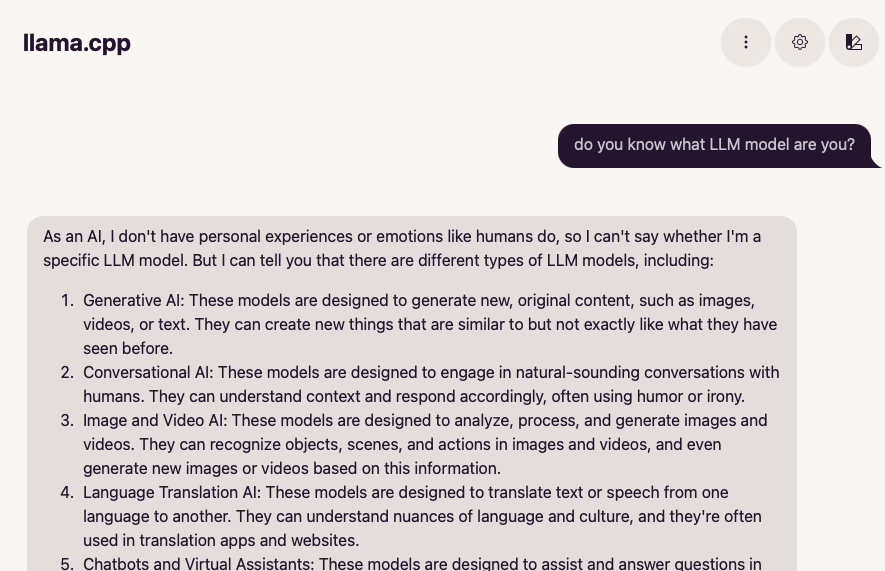
No, you dummy, you are SmolLM2-1.7B
API Key
Using --api-key authenticates the request (using Authorization: Bearer afe234232defd header); there is an option to set it in the Web UI so that it can successfully authenticate with the server (use the Settings on the top-right corner).
If using an HTTP client (e.g., Postman, or HTTPie, or curl) you will need to set the header accordingly.
Flash Attention
--flash-attn (LLAMA_ARG_FLASH_ATTN) enables Flash attention: an optimization that’s supported by most recent models; enabling it should improve the generation performance for some models.
It prevents frequent swaps between High-Bandwidth Memory (HBM) and on-chip SRAM, by compressing the computation of the outputs from the inputs and weights, and keeping the inputs, query in SRAM.
Tokens
A prompt to an LLM needs to be “tokenized” so that the model can run computations on the input values; “tokens” are a fancy way of calling indexes in a dictionary of all possible word inputs.
To take a peek at them, there is a /tokenize (and respective /detokenize) API:
POST http://localhost:8080/tokenize
Content-Type: Application/JSON

{
    "content": "Please show me how this has been tokenized, oh ye supreme intelligent being"
}
Response:
{
    "tokens": [
        10180,
        549,
        ...
        11339,
        1036
    ]
}
POST http://localhost:8080/detokenize
Content-Type: Application/JSON

{
    "tokens": [
        10180,
        1488,
        9876,
        1036
    ]
}
Response:
{
    "content": "Please something herb being"
}
Dynamic Temperature
Read the article:
Dynamic Temperature Sampling (for better Creativity & Coherency in Large Language Models)
The hypothesis is that HHI (sum squared probabilities) is a helpful metric for scaling due to the fact we can roughly measure how ‘concentrated’ the language model’s probabilities are, with heavy bias towards the top tokens implying less room for randomization (aka, lower temps).
HHI (Herfindahl-Hirschman Index)
Herfindahl–Hirschman Index is defined as the sum of the squares of the probabilities of each event (where the sum of all pi is 1):
HHI = ∑ pi2
where ∑ pi =1.
HHI is more sensitive to multimodality in a distribution than Shannon entropy:
Entropy = – ∑ pi ⋅ log2(pi)
The HHI is inversely related to entropy:
- High HHI indicates low entropy (more concentrated distribution).
- Low HHI indicates high entropy (more uniform distribution).
Meta LLama 3.x
Models
Meta has released several iterations of its Llama 3 family of models:
Current:
- Llama 3.3: The Llama 3.3 is a text only instruct-tuned model in 70B size (text in/text out).
History:
- Llama 3.2: The Llama 3.2 collection of multilingual large language models (LLMs) is a collection of pretrained and instruction-tuned generative models in 1B and 3B sizes (text in/text out).
- Llama 3.2 Vision: The Llama 3.2-Vision collection of multimodal large language models (LLMs) is a collection of pretrained and instruction-tuned image reasoning generative models in 11B and 90B sizes (text + images in / text out)
- Llama 3.1: a collection of pretrained and fine-tuned text models with sizes ranging from 8 billion to 405 billion parameters pre-trained on ~15 trillion tokens.
Let’s try and run LLama 3.2 in 3B size.
Note Before being able to access the Llama model you will need to agree to the licensing terms, by applying on HuggingFace Meta’s repository: this is fairly simple, and you can expect approval in few minutes – I tried pretty late at night and still got access within less than 15 minutes.
Meta does not release the .safetensors file, nor the GGUF weights, but no fear, there are always good folks in the open source space who step in to help out the community.
In this case, it’s pretty straightforward to download the 8b quantized GGUF model from Bartowski’s Llama-3.2-3B-Instruct-GGUF repository:
huggingface-cli download \
    --include "*-Q5_K_L.gguf" \
    --local-dir ./Llama-3.2-3B-Instruct \
    bartowski/Llama-3.2-3B-Instruct-GGUF
Note the weights are already quantized (there is a fairly large choice of different quantization types) and they can be directly used in llama-server:
llama-server \
    -m Llama-3.2-3B-Instruct/Llama-3.2-3B-Instruct-Q5_K_L.gguf
This works to the extent that the model can be used interactively from a local deployment:
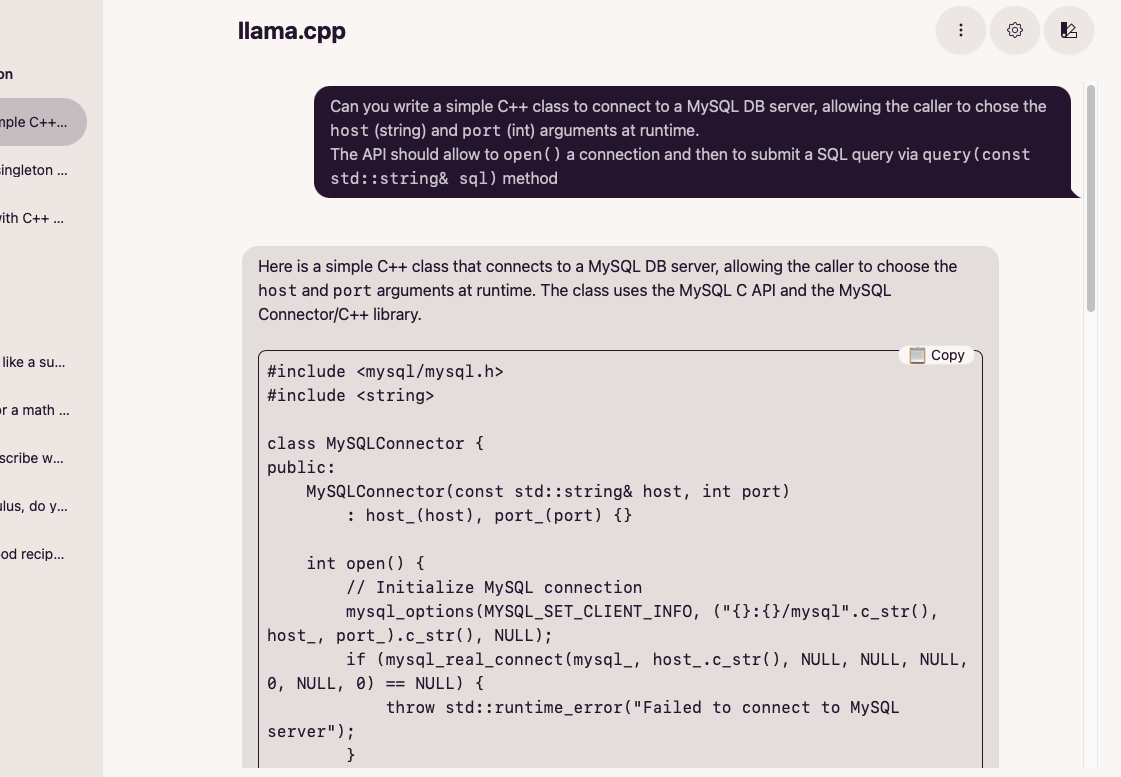
The code suggested is, alas, a bit off the mark.
StarCoder
Finally we can try and run Starcoder a “15.5B parameter models trained on 80+ programming languages,” which should be particularly apt at solving coding questions.
The repository contains several .safetensors files, so we’ll need a slightly different process.
git clone https://huggingface.co/bigcode/starcoder

# Download directly, as Git LFS will not clone the contents
huggingface-cli download \
    --include "*.safetensors" \
    --local-dir ./starcoder \
    bigcode/starcoder
If already authenticated (
A token is already saved on your machine.) thelogincommand can be exited, and you can usehuggingface-cli whoamito confirm identity.
The download will take a loooong time, grab a book
To convert to GGUF use:
./llama.cpp/convert_hf_to_gguf.py \
    ./starcoder \
    --outfile ./starcoder/starcoder.gguf
This one is a BIG model:
ll starcoder/*.gguf
.rw-r--r--   32G marco 11 Dec 23:42  starcoder/starcoder.gguf
Then quantize it (may need a few trial-and-error):
llama-quantize \
     starcoder/starcoder.gguf \
     starcoder/starcoder.q8.gguf \
     Q8_0

# As expected it approximately halves the size.
ll ./starcoder/*.q8.gguf
.rw-r--r--   17G marco 11 Dec 23:49  ./starcoder/starcoder.q8.gguf
Note
You can directly download the GGUF quantized models from mradermacher/starcoder-GGUF
Let’s see if llama-server can handle this:
llama-server -m ./starcoder/starcoder.q8.gguf
And it does!
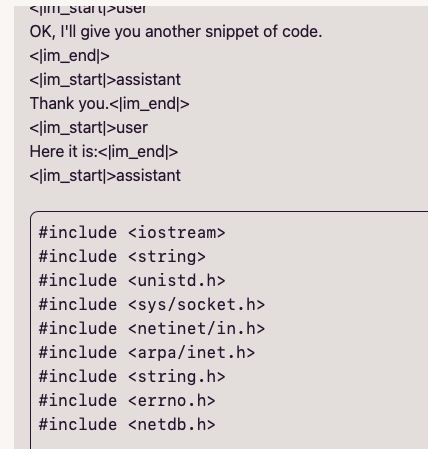
As you can see the prompting is a bit off: see Technical Assistant Prompt for examples.
The <| and |> are just delimiters and mark the start/end of the user prompt, or the LLM’s response; despite that, llama-cpp can (more or less) successfully handle it, and will provide the requested snippet of code.
Conclusions
There are literally hundreds of available models on HuggingFace repository, all of them available for experimentation and a vast majority of them can be run locally from a reasonably recent laptop, without too much effort.
The next step will be to create a few interactive AI Agents, possibly backed by different LLMs, and having different “personas”, and have them collaborating to solve specific problems.
But this is a matter for a future blog post, in the meantime thanks for reading and happy hacking!



 Code Trips & Tips
Leave a comment