

If you’ve been following along with my AI-related posts, you know I’m a fan of running models locally. There’s something deeply satisfying about having an LLM respond to your queries without sending your data to some cloud endpoint — and without paying per token.
Today I want to walk you through a small project I put together: a chat application that runs entirely on your Mac, powered by vLLM-MLX. But first, let’s talk about what vLLM actually is and why it matters.
What is vLLM?
In the world of AI infrastructure, vLLM (Virtual Large Language Model) is a high-performance library designed to make serving LLMs fast, efficient, and significantly cheaper to run.
If you’ve ever fired up a model locally and noticed it was sluggish — or watched your GPU memory spike while throughput remained stubbornly low — vLLM is the kind of tool engineers reach for to fix that.
The Secret Sauce: PagedAttention
The “v” in vLLM stands for Virtual, a nod to how operating systems manage memory. The core innovation here is an algorithm called PagedAttention.
Here’s the problem it solves: traditional LLM serving wastes GPU memory because it pre-allocates large blocks of space for the “KV Cache” (essentially the model’s short-term memory of your conversation). This memory ends up fragmented and underutilized — you’re paying for VRAM you’re not actually using.
PagedAttention partitions this memory into small “pages,” much like virtual memory in your operating system. The result? vLLM can utilize close to 100% of available GPU memory, which translates directly into higher throughput.
Why Should You Care?
If you’re calling OpenAI’s API, none of this matters to you — they handle the infrastructure. But if you’re hosting your own models (Llama 3, Mistral, Qwen, etc.) on your own hardware, vLLM is often the difference between “demo that works” and “service that scales.”
| Feature | What It Means |
|---|---|
| Throughput | 10–20x more requests per second than naive implementations |
| Memory Efficiency | Run larger models on smaller GPUs |
| Continuous Batching | New requests slot in as others complete — no waiting for batch boundaries |
| Open Source | Community-driven, supports most model architectures |
vLLM-MLX: vLLM for Apple Silicon
The original vLLM targets NVIDIA GPUs via CUDA. If you’re on a Mac with an M1/M2/M3/M4 chip, you need something that speaks MLX — Apple’s machine learning framework that runs on the unified memory architecture of Apple Silicon.
Enter vLLM-MLX: a port that brings vLLM’s serving capabilities to the Mac. It’s not a 1:1 feature match with the CUDA version, but for local development and experimentation, it’s excellent.
The Demo: A Chat App with PDF Support
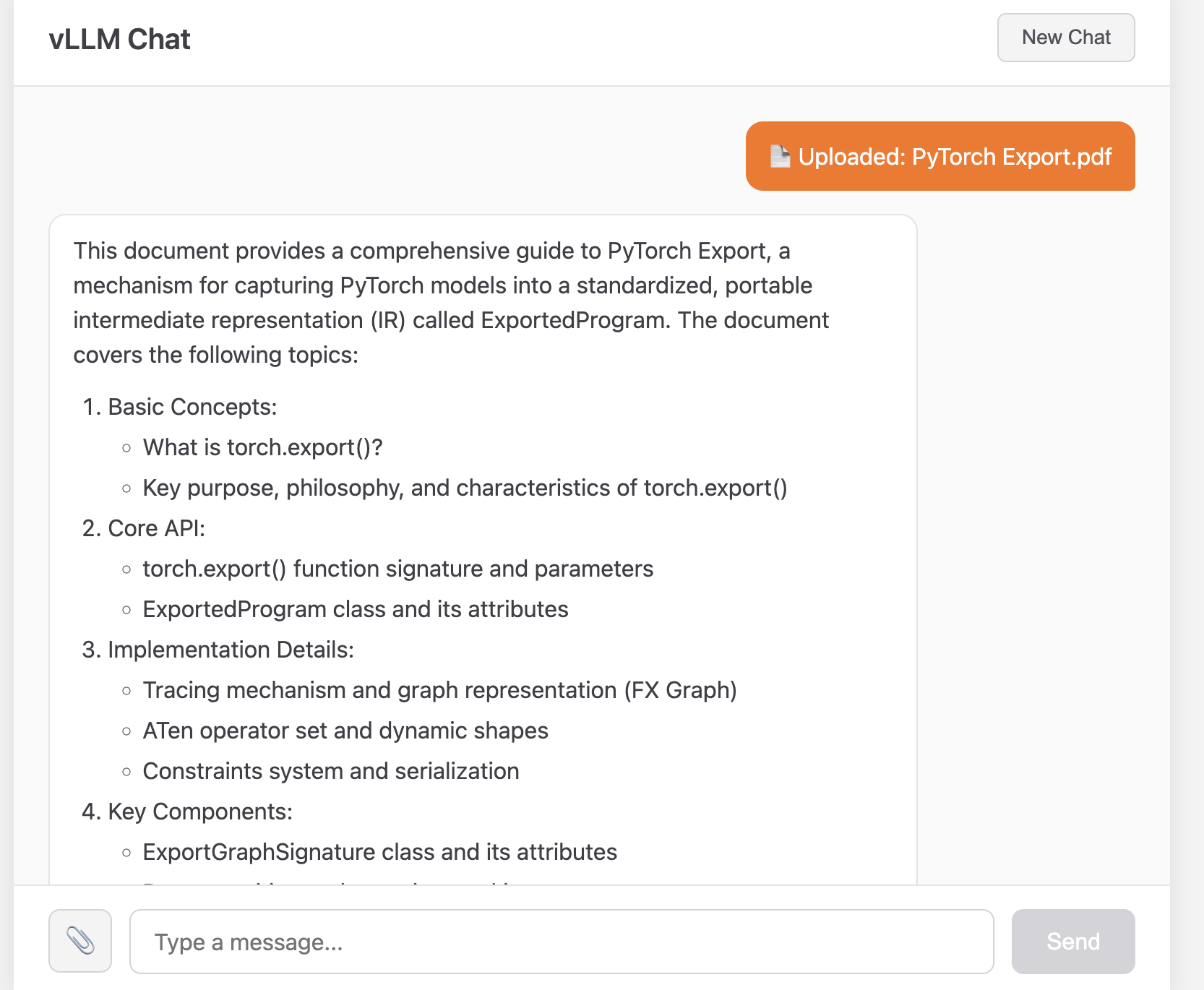
I built a simple application to showcase what you can do with vLLM-MLX. It’s a chat interface where you can:
- Have multi-turn conversations with an LLM
- Upload PDF documents and ask questions about them
- See responses rendered as GitHub-flavored Markdown
The code is available at github.com/alertavert/vllm-mlx-demo.
Architecture
The setup is straightforward:
┌─────────────────┐ ┌───────────-──────┐│ React Frontend │ ──▶ │ FastAPI Backend ││ (localhost:5173)│ │ (localhost:8080)│└─────────────────┘ └────────┬───-─────┘ │ ▼ ┌─────────────────┐ │ vLLM-MLX │ │ SimpleEngine │ └─────────────────┘ │ ▼ ┌─────────────────┐ │ MLX / Metal │ │ (Apple GPU) │ └─────────────────┘
Backend (main.py): A FastAPI server that wraps vLLM-MLX’s SimpleEngine. It maintains conversation sessions in memory and handles PDF text extraction via PyMuPDF.
Frontend (app/): A React + TypeScript application with a clean chat UI. User messages appear in orange bubbles; assistant responses render as Markdown with syntax highlighting for code blocks.
The Backend in 30 Lines
Here’s the core of the chat endpoint:
from vllm_mlx.engine import SimpleEngineMODEL_ID = "mlx-community/Llama-3.2-3B-Instruct-4bit"engine = SimpleEngine(model_name=MODEL_ID)@app.post("/chat")async def chat(req: ChatRequest): session_id = req.session_id or str(uuid.uuid4()) if session_id not in sessions: sessions[session_id] = [] sessions[session_id].append({"role": "user", "content": req.message}) result = await engine.chat( messages=sessions[session_id], max_tokens=req.max_tokens, temperature=req.temperature, ) sessions[session_id].append({"role": "assistant", "content": result.text}) return ChatResponse(session_id=session_id, response=result.text)
That’s it. The SimpleEngine handles tokenization, inference, and all the MLX machinery. You just pass in messages and get text back.
PDF Upload
The PDF feature is similarly straightforward. When a user uploads a document:
- PyMuPDF extracts the text
- We prepend it to the user’s query as context
- The LLM sees both the document and the question in the same message
pdf_text = extract_text_from_pdf(file)user_content = f"""Here is a PDF document:---{pdf_text}---{query}"""
It’s not RAG, it’s not fancy — but for documents that fit in the context window, it works remarkably well.
Running It Yourself
Prerequisites
- Mac with Apple Silicon
- Python 3.11+
- Node.js 18+
Setup
# Clone the repogit clone https://github.com/alertavert/vllm-mlx-demo.gitcd vllm-mlx-demo# Set up Python environmentpython3 -m venv .venvsource .venv/bin/activatepip install -r requirements.txt# Set up frontendcd app && npm install && cd ..
Run
Terminal 1 (backend):
source .venv/bin/activatepython main.py
Terminal 2 (frontend):
cd app && npm run dev
Open http://localhost:5173 and start chatting.
The first run downloads the model (~2GB for Llama 3.2 3B 4-bit). Subsequent runs start in seconds.
Choosing a Model
The default is mlx-community/Llama-3.2-3B-Instruct-4bit — small, fast, and surprisingly capable. But you can swap in any model from mlx-community on Hugging Face:
# In main.pyMODEL_ID = "mlx-community/Mistral-7B-Instruct-v0.3-4bit" # Larger, more capableMODEL_ID = "mlx-community/Qwen2.5-7B-Instruct-4bit" # Good at reasoningMODEL_ID = "mlx-community/gemma-2-9b-it-4bit" # Google's Gemma
Larger models need more memory and run slower, but produce better output. On an M3 Max with 64GB, I can comfortably run 7B models. The 3B model runs fine even on base M1 machines.
What’s Next?
This demo is intentionally minimal. Some natural extensions:
- Streaming responses: vLLM-MLX supports async streaming; the frontend could display tokens as they arrive
- Persistent storage: Replace the in-memory session dict with Redis or SQLite
- RAG: For larger documents, chunk them and use embeddings for retrieval
- Multiple models: Hot-swap between models based on the task
Learn More
If you want to go deeper into how LLM inference engines work under the hood, I recommend these two posts from Neutree:
- Understanding LLM Inference Engines: Inside Nano-vLLM (Part 1)
- Understanding LLM Inference Engines: Inside Nano-vLLM (Part 2)
They walk through building a minimal vLLM-style engine from scratch — great for understanding what PagedAttention and continuous batching actually do at the code level.
Wrapping Up
Running LLMs locally used to mean wrestling with CUDA drivers and praying your GPU had enough VRAM. On Apple Silicon with MLX, it’s become almost trivial — install a package, point it at a model, and you’re serving inference.
vLLM-MLX brings production-grade serving patterns to the Mac. Whether you’re prototyping a product, learning how LLMs work, or just want a private AI assistant that doesn’t phone home, it’s a solid foundation.
The code is at github.com/alertavert/vllm-mlx-demo. Clone it, break it, extend it. Happy hacking.


 Code Trips & Tips
Leave a comment