
Warp’s Agent Mode is great, but by default every request is routed through Warp’s cloud backend to hosted models. The good news: Warp also supports custom, OpenAI-compatible model endpoints — and Ollama speaks exactly that protocol. So you can point Warp at a local Qwen 2.5 running on your own machine.
One catch worth understanding up front: it’s Warp’s backend, not your laptop, that actually calls the endpoint. That means localhost won’t do — the endpoint has to be reachable from the internet. That’s where ngrok comes in. Here’s the full recipe on macOS.
1. Install Ollama and run Qwen 2.5
Install Ollama (Homebrew, or the installer from ollama.com):
brew install ollama
Start the server (or just launch the menu-bar app). It listens on port 11434 by default:
ollama serve
Pull a Qwen 2.5 model. The 7B general model is a fine start; the coder variant is better for agentic/coding work:
ollama pull qwen2.5:7b# or, better for coding in Warp:ollama pull qwen2.5-coder:7b
Quick smoke test:
ollama run qwen2.5:7b "Say hi in one line"
Two commands you’ll lean on constantly:
ollama list— everything installed on disk, with exact tags.ollama ps— what’s currently loaded in memory (empty just means nothing’s hit it recently; models unload after ~5 minutes of idle).
2. Expose Ollama with ngrok (mind the Host header)
Install ngrok and add your (free) authtoken:
brew install ngrokngrok config add-authtoken <YOUR_TOKEN>
Now the important part — start the tunnel with --host-header=rewrite:
ngrok http 11434 --host-header=rewrite
Why the flag? Ollama validates the incoming Host header as an anti–DNS-rebinding measure. Through a tunnel, that header becomes your *.ngrok-free.dev domain, which Ollama rejects with a 403 Forbidden. --host-header=rewrite rewrites it back to localhost:11434, so Ollama is happy again. Skip it and you’ll stare at 403s all day.
Copy the HTTPS forwarding URL ngrok prints, e.g. https://something.ngrok-free.dev.
3. Point Warp at your endpoint
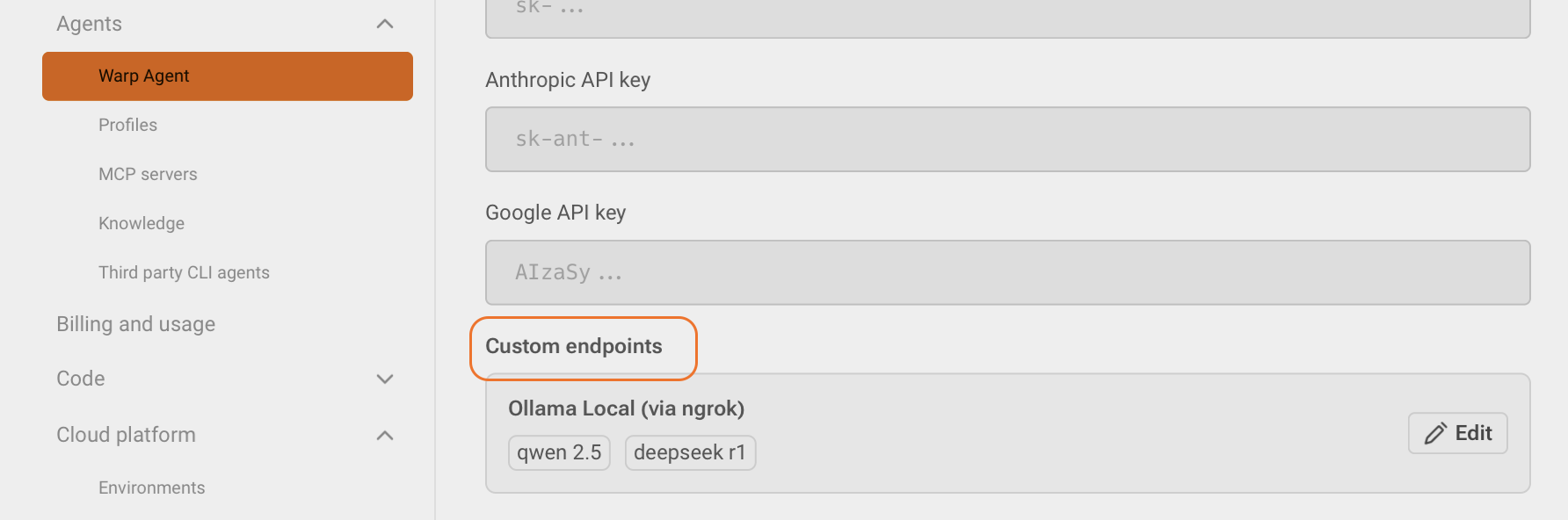
Open Warp → Settings → Warp Agent and add a custom endpoint (custom inference). Fill in:
- Endpoint URL: your ngrok URL with the OpenAI path —
https://something.ngrok-free.dev/v1. It must be HTTPS and public; Warp deliberately rejectslocalhostand private hosts.
Note the/v1added at the end of the URL that you got fromngrok
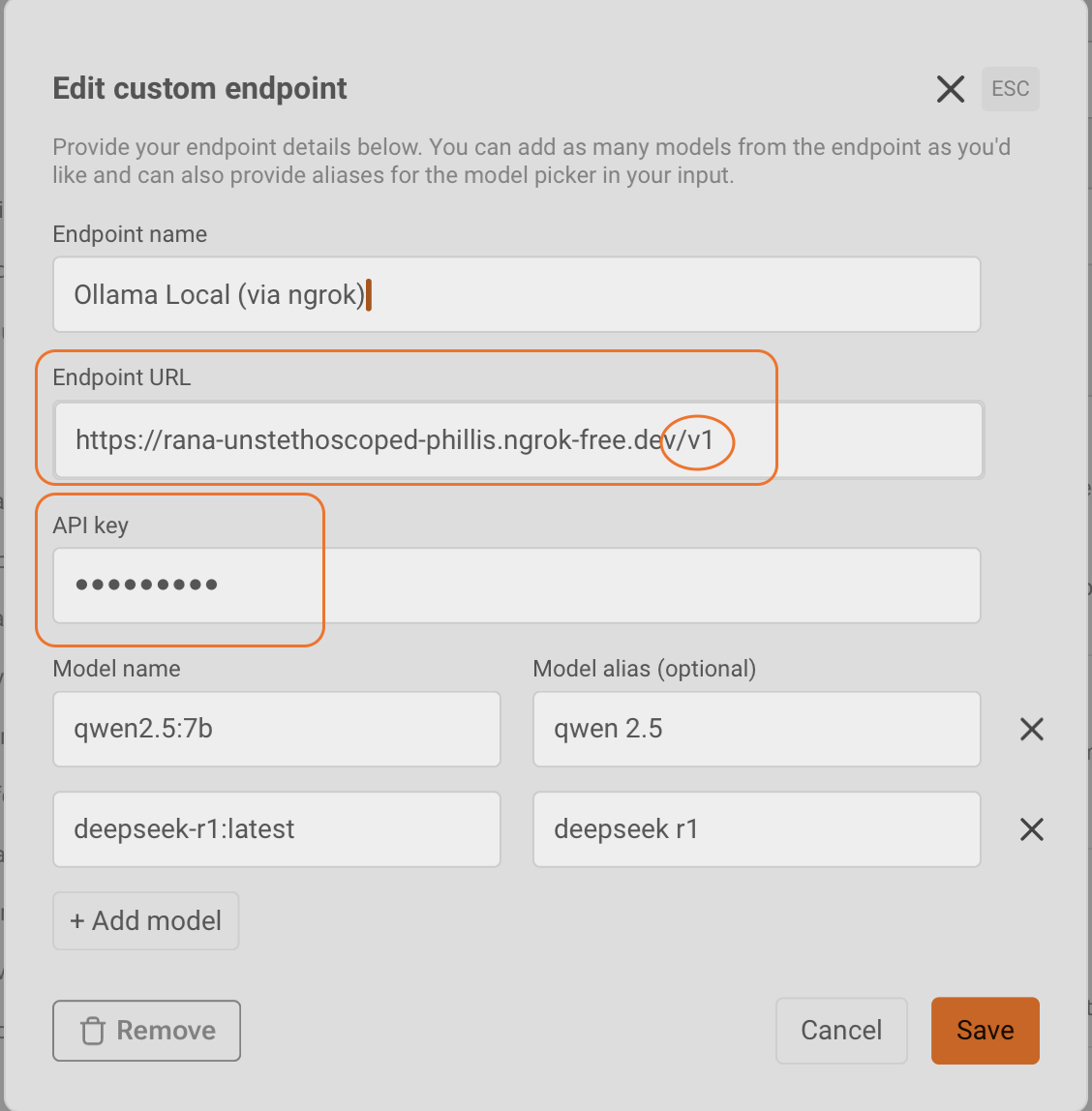
- API key: any non-empty placeholder like
ollama. Warp requires the field; Ollama ignores it. - Model name: the exact Ollama tag, e.g.
qwen2.5:7b. Add a friendly alias if you want a nicer label in the picker.
Save, then pick the model from Warp’s model dropdown and start chatting with your local Qwen.
4. Choosing models: ollama list + exact spelling
Whatever you’ve pulled shows up here:
ollama list
Those exact names are what you type into Warp’s model field, and they’re what appear in Warp’s model dropdown. Spelling matters — the name is sent verbatim to Ollama, and it’s case-sensitive and tag-qualified. Get it wrong and you’ll get:
404 Not Found {"message":"model 'QWEN2.5' not found"}
QWEN2.5 fails; qwen2.5:7b works. Copy-paste straight from ollama list to be safe.
Gotchas & honest caveats
- Privacy: compute is local, but the data path is
client → Warp backend → ngrok → your Mac. Your prompts still traverse Warp’s servers and a public tunnel, so this is “local compute,” not a fully private setup. - Security: ngrok makes Ollama reachable from the internet, and Ollama has no auth by default. Lock it down with an ngrok traffic-policy rule or a small reverse proxy that enforces a token.
- Model quality: a 7B model can be flaky with Warp’s tool-heavy agent protocol.
qwen2.5-coder(or something larger) behaves noticeably better.
That’s it — a local Qwen 2.5 driving Warp in a few minutes.


Leave a comment